Written by: Aaron Rovner, Founder, Saas Hero | Last updated: August 28, 2026
Key Takeaways
Qualifying Google Ads agency demo requests starts with two hard gates: $15k+/mo ad spend and $10M+ annual revenue so prospects can exit learning mode and support CRM-tied results.
Intake forms need mandatory dropdown fields for spend, revenue, CRM ownership, and sales team size, with conditional logic that routes low-fit prospects away from the calendar automatically.
Auto-routing rules plus a 100-point lead-scoring model separate high-fit retainers from marginal leads, sending 75+ point leads to sales and lower scores to nurture or disqualification.
Pre-call research and BANT discovery questions, especially the CRM optimization question, confirm measurement readiness and urgency before every demo so sales time stays focused on qualified conversations.
Every qualified demo must be logged in the agency CRM with structured fields so the system can be measured and improved; SaaSHero runs this exact qualification playbook at scale, and you can book a discovery call to see how it applies to your program.
Step 1: Set the Non-Negotiable Spend and Revenue Gates
Every qualification system starts with hard gates that disqualify a prospect before any human time is spent. SaaSHero enforces two specific gates.
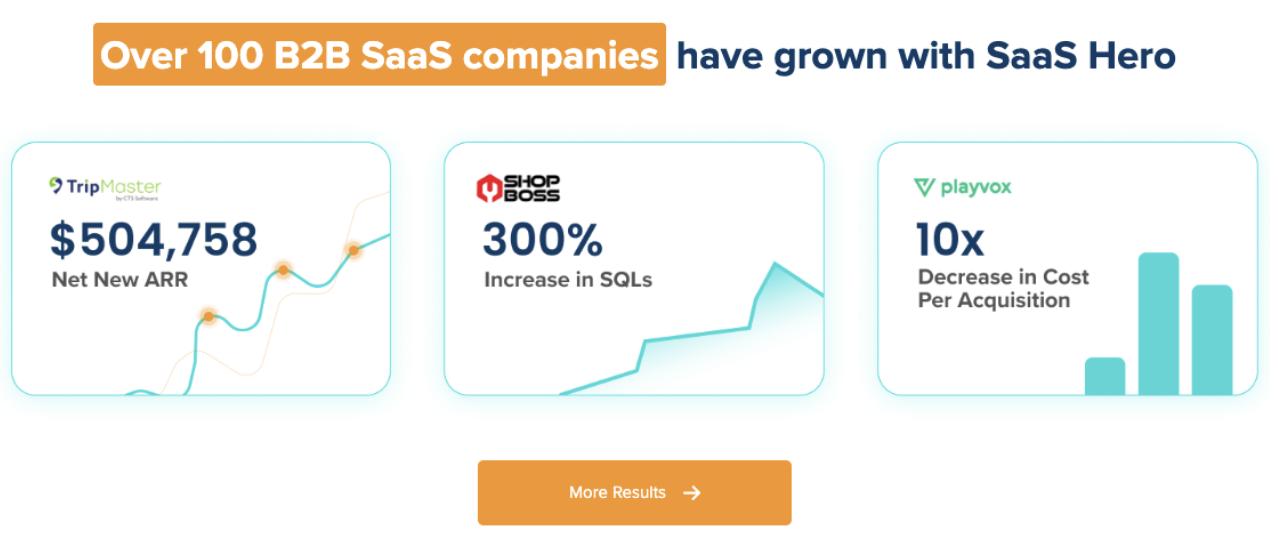
Over 100 B2B SaaS Companies Have Grown With SaaS Hero
See exactly what your top competitors are doing on paid search and social
The second gate is $10M or more in annual revenue. This floor signals product-market fit, a funded marketing budget, an internal sales team with a CRM, and a buying committee that can make and defend a retainer decision. Without a CRM record of what happens after a lead is created, the agency cannot optimize to revenue instead of form fills, which is the basis of SaaSHero’s method.
Common Mistake: Treating the spend floor as a preference instead of a hard gate. Accounts below $15k per month rarely generate the conversion volume needed for Smart Bidding to optimize toward CRM outcomes.
Tip: Ask for current monthly ad spend, not planned or aspirational spend, in the intake form. Prospects who have not started spending are not qualified.
Troubleshooting: If a prospect claims $15k+ per month but cannot name the platform or provide a screenshot, treat the answer as unverified and route to nurture until they confirm.
Step 2: Turn the Intake Form into a Qualification Filter
The intake form enforces the hard gates from Step 1 and acts as the first qualification layer. It must surface CRM ownership, a sales-led motion, and internal marketing headcount before any calendar slot appears.
SaaS Hero: The client-friendly SaaS marketing agency that proves pipeline
Current monthly Google Ads spend (dropdown: under $5k / $5k–$14,999 / $15k–$30k / $30k+)
Annual company revenue (dropdown: under $5M / $5M–$9.9M / $10M–$50M / $50M+)
Business model (dropdown: B2B SaaS / B2B Professional Services / B2C / Ecommerce / Other)
CRM in use (dropdown: HubSpot / Salesforce / Other / None)
Internal sales team size (dropdown: No sales team / 1–3 reps / 4–10 reps / 10+)
Internal marketing team size (dropdown: Just me / 2–4 people / 5+)
Current agency or in-house manager (yes/no)
Primary goal (dropdown: Replace underperforming agency / Scale existing program / Build from scratch)
Common Mistake: Relying on a single open-text “Tell us about your needs” field. This produces unstructured answers that require manual review and slow routing.
Tip: Use conditional logic so that selecting “B2C” or “Ecommerce” under business model redirects to a polite out-of-scope message instead of the calendar.
Troubleshooting: If form completion rates drop after adding fields, reduce friction with progressive profiling. Show the spend and revenue fields first, then surface CRM and team fields after those are answered.
Step 3: Create Auto-Routing Rules and Clear Disqualifier Copy
Ad spend under $15k per month → disqualify, send nurture sequence
Revenue under $10M → disqualify, send nurture sequence
Business model is B2C, Ecommerce, or Local → disqualify, send out-of-scope message
No CRM in use → disqualify, send resource on CRM setup before re-engaging
No internal sales team → disqualify, send nurture sequence
All gates passed → route to calendar with pre-call questionnaire
Ready-to-copy disqualifier script for email or chat:
“Thank you for reaching out. Based on what you have shared, your current ad spend is below the $15,000 per month floor our management model requires to generate the conversion volume needed for CRM-tied optimization. We would be a poor fit at this stage and do not want to waste your time. We have linked a resource below on building toward that threshold. Please reach back out when your program reaches that level. We would be glad to talk.”
Tip: Nurture sequences for disqualified prospects should deliver value such as budget planning guides and conversion benchmarks instead of sales-heavy content. The goal is re-engagement when they cross the floor.
Once routing rules and disqualifier language are in place, the next step is separating high-fit prospects from marginal ones with systematic scoring.
B2B SaaS = 15 / B2B Professional Services = 10 / Other = 0
Sales-led motion with CRM required
CRM in active use
10
HubSpot or Salesforce = 10 / Other CRM = 5 / None = 0
Confirms CRM infrastructure
Internal sales team present
10
4+ reps = 10 / 1–3 reps = 5 / None = 0
Ensures leads have a destination
Marketing team 2–4 FTEs, no paid specialist
10
Exact fit = 10 / 1 FTE or 5+ FTEs = 5 / Dedicated paid specialist in-house = 0
Matches SaaSHero’s preferred staffing shape
Board or PE/VC pressure to scale pipeline
10
PE/VC-backed with explicit pipeline target = 10 / Founder-led with committed number = 5 / No external pressure = 0
Signals urgency
Current agency underperforming
5
Yes, actively looking to replace = 5 / No current agency = 3 / Happy with current agency = 0
Indicates replacement purchase
Optimizing to CRM data (not form fills)
5
Yes, CRM-connected = 5 / Partially = 2 / Form fills only = 0
Confirms measurement readiness from Step 1
Routing thresholds are simple. Scores from 75 to 100 route to sales immediately. Scores from 50 to 74 enter nurture and re-qualification. Scores below 50 are disqualified.
TripMaster adds $504,758 in Net New ARR in One Year
SaaSHero’s pre-call research checklist (15 minutes total):
Verify the contact (2 min): Confirm name, title, LinkedIn profile, and that the role matches a primary decision-maker title such as VP of Marketing, CMO, VP of Demand Generation, or Operating Partner.
Company snapshot (3 min): Identify what they sell, to whom, and at what ACV. Confirm whether the motion is sales-led by checking the website and LinkedIn company page.
Trigger event scan (3 min): Look for recent funding, a new CMO or VP hire, job postings for demand gen roles, PE acquisition, or board-level pipeline pressure. These events often create readiness to switch agencies.
Ad account signals (2 min): Check Google Ads Transparency Center and LinkedIn Ad Library for active campaigns. Review creative quality, landing page destinations, and whether ads point to the homepage, which often signals underperformance.
Tip: If the prospect’s ad library shows no active campaigns despite a claim of $15k+ per month in spend, flag this before the call. Either the spend is inaccurate or the account is paused, and both cases need clarification.
Step 6: Use Five BANT Discovery Questions That Surface CRM Readiness
Budget: “You mentioned $[X] per month in current ad spend on the form. Is that the full paid media budget across all platforms, and is it already approved for the next six months?” This confirms that the floor is real and that budget authority exists.
Authority: “Who else is involved in selecting a new agency, and does this decision route through finance, RevOps, or your head of sales?” This maps the buying committee and surfaces CFO and RevOps veto risks early.
Need: “Are your campaigns currently optimized against CRM data such as qualified pipeline and lifecycle stage events, or against form submissions?” This is SaaSHero’s mandatory discovery question. The answer confirms measurement readiness and whether CRM-tied optimization is mechanically possible.
Need (secondary): “When your board or investors ask about marketing performance, what metric do they use, such as cost per lead, cost per SQL, pipeline coverage, or CAC payback?” This reveals board pressure and whether the prospect already speaks in revenue-outcome language.
Timeline: “What is driving the timing of this search, such as a board meeting, a contract renewal, or a pipeline number you need to hit by a specific date?” This identifies the switching moment and urgency level.
Tip: If the answer to the CRM question is “we optimize to form submissions,” do not disqualify immediately. First assess whether the prospect has a CRM and a sales team. If both are present, you are dealing with a fixable measurement problem instead of a structural disqualifier.
Step 7: Log Qualified Demos in Your CRM and Track Outcomes
Pipeline impact, not form volume, defines success for a qualification system. Logging every qualified demo in the agency’s CRM with structured fields allows measurement of the entire process from form fill to closed revenue.
Tip: Set a monthly review cadence to compare qualified-to-unqualified ratios by lead source. If paid social produces a higher disqualification rate than paid search, adjust audience targeting or form fields for that channel.
Troubleshooting: If sales acceptance rate is below 40%, the scoring thresholds are likely too low. Raise the minimum score for calendar routing from 75 to 80 and re-evaluate after 30 days.
Checklist Recap and Maturity-Based Next Steps
The 7-step qualification playbook in summary:
Set hard gates: $15k+ per month ad spend, $10M+ revenue, B2B SaaS or professional services, and a sales-led motion with CRM.
Embed mandatory form fields with dropdowns and conditional logic that route low-fit answers away from the calendar automatically.
Build auto-routing rules and ready-to-copy disqualifier language for three paths: pursue, nurture, and disqualify.
Deploy the 100-point lead-scoring model, then route 75+ to calendar, 50–74 to nurture, and below 50 to disqualify.
Run the 15-minute pre-call research checklist to verify ICP signals and form a working hypothesis before every demo.
Ask the five BANT discovery questions with SaaSHero-style wording that surfaces CRM optimization status and board pressure.
Log every qualified demo in the CRM with structured fields, then review the qualified-to-unqualified ratio monthly.
Next-action prompts vary by agency maturity but follow the same system.
New agency (under 10 retainer clients): Start with Steps 1 and 2. Set the hard gates and redesign the intake form before building the scoring model. Qualification discipline compounds faster than scoring sophistication at this stage.
Scaling agency (10–30 retainer clients): Implement Steps 3 and 4. Build auto-routing and deploy the 100-point model in your CRM so the first triage pass no longer depends on human judgment.
Established agency (30+ retainer clients): Audit Steps 5, 6, and 7. Pre-call research and BANT discovery are where high-fit prospects are often lost to poor preparation, and CRM logging is where the system becomes self-improving.
How long does it take to set up this 7-step qualification system?
Steps 1 and 2, which cover hard gates and form fields, can be live within a week. They require a form rebuild and conditional logic configuration in the scheduling or CRM tool the agency uses. Auto-routing in Step 3 usually takes another one to two weeks to configure and test, depending on CRM complexity.
The 100-point scoring model in Step 4 requires a half day to build in a spreadsheet and another day to map into CRM automation. Steps 5 through 7 are process changes rather than technical builds and can be adopted immediately. A realistic timeline for the full system is three to four weeks from decision to live operation. SaaSHero’s own qualification system was built iteratively over multiple years as the program matured.
Which team roles are responsible for running this system?
The intake form and auto-routing in Steps 1 through 3 are owned by whoever manages the agency’s CRM and marketing automation. This is typically a marketing operations or RevOps function, or the agency owner in smaller shops. The lead-scoring model in Step 4 is a shared responsibility between marketing and sales. Marketing sets the scoring thresholds, and sales validates them against actual close rates each quarter.
Pre-call research in Step 5 and BANT discovery in Step 6 are owned by the account strategist or whoever runs the discovery call. At SaaSHero, this is the Senior Account Strategist. CRM logging in Step 7 is a sales function with a standing monthly review cadence. In a two- to three-person agency, one person may own all seven steps, and the system remains light enough for that setup.
Can a smaller agency adapt this system if it does not yet have a $15k+ per month spend floor?
A smaller agency can adapt the system by adjusting thresholds. The underlying logic of hard gates, form-based routing, point-based scoring, pre-call research, BANT discovery, and CRM logging applies at any spend floor. An agency with a $5k per month floor would replace the $15k and $10M revenue gates with its own non-negotiable minimums, recalibrate the scoring table, and adjust the disqualifier language.
The critical principle is that the gates stay hard and are enforced by automation instead of case-by-case human judgment. SaaSHero sets its floor at $15k+ per month because below that threshold there is insufficient conversion volume for Smart Bidding to optimize toward CRM outcomes. The floor reflects the method rather than an arbitrary number. Agencies using different optimization methods may support a lower floor.
What are the risks of running a strict qualification system?
The primary risk is false negatives, which means disqualifying prospects who would have become high-value clients. This most often occurs when prospects understate their ad spend on the intake form, such as when spend is split across platforms and they report only Google Ads, or when a company is at $8M revenue but growing quickly toward the $10M floor.
The mitigation is a human review step for prospects who score 60–74 on the 100-point model instead of auto-routing them to nurture. A secondary risk is that strict disqualification reduces total demo volume and creates short-term pipeline anxiety. The correct response is to track qualified pipeline value instead of demo count. A calendar with five high-fit demos at $15k+ per month retainer potential is worth more than twenty mixed-fit demos. SaaSHero’s own target is a 40% or higher qualification rate on booked demos, measured against pipeline impact instead of form volume.
How often should the scoring model and form fields be recalibrated?
A formal recalibration should run quarterly using the CRM data logged in Step 7. The review compares the lead score at routing against the eventual discovery call outcome, such as qualified, nurture, or disqualified, and against closed-won retainer data. If prospects scoring 75–80 close at a lower rate than those scoring 85+, raise the routing threshold.
If a specific disqualification reason, such as “no CRM in use,” appears frequently among prospects who otherwise score well, consider adding a CRM-readiness nurture track instead of a hard disqualify. Form fields should be reviewed whenever a new disqualification pattern emerges from the sales feedback loop. If three consecutive disqualified prospects cite the same reason, that reason belongs in the form as a conditional routing trigger. SaaSHero reviews its own qualification criteria whenever a new client segment or channel mix produces a materially different close rate pattern.
Includes unlimited revisions as well as custom written copy (from a human, not ChatGPT). We’ll send a first draft in Figma and you can request as many edits as you’d like. We won’t ever activate any landing pages until you give us the final OK