




Written by: Aaron Rovner, Founder, Saas Hero | Last updated: September 2, 2026
Key Takeaways
- Most Google Ads accounts still optimize for form fills instead of revenue, so the algorithm learns the wrong signals.
- Connecting Google Ads to your CRM enables accurate attribution, revenue-based bidding, and smarter audience targeting with first-party data.
- Native integrations, middleware, and custom APIs each offer tradeoffs, and native connectors are the best starting point for most mid-market teams.
- Offline conversion tracking is essential. Demote form fills to secondary and make CRM-verified events like Opportunity Created or Closed Won the primary conversion.
Why Integrate Google Ads with Your CRM
The Self-Fulfilling Prophecy
An optimization algorithm finds more of whatever it is rewarded for. When you point it at a form fill, it finds the people most likely to fill out forms such as students, competitors, job seekers, and existing customers. Cost per lead falls and the dashboard improves, while pipeline does not move.
73% of B2B leads are not sales-ready when first generated, yet 67% of B2B Google Ads campaigns still optimize for lead volume metrics rather than downstream conversion to SQL or closed-won deals. The result is a self-fulfilling cycle where the machine gets better at finding the wrong people every month the wrong signal is fed to it.
Three Core Benefits of CRM-Connected Google Ads
Connecting your CRM to Google Ads produces three compounding advantages.
- Accurate attribution. Last-click attribution assigns all credit to the final touchpoint before conversion, typically a branded search that fires after the buyer has already decided. For B2B sales cycles measured in months with multiple stakeholders, multi-touch attribution models distribute credit across touchpoints and provide a more accurate picture of which campaigns drive pipeline.
- Revenue-focused bidding. Enhanced conversions for leads and offline conversion imports feed CRM signals such as Opportunity Created and Closed Won back into Google Smart Bidding. The platform then optimizes for revenue outcomes instead of raw lead volume. Implementing offline conversion imports with CRM data can produce a 30–60% improvement in SQL rate.
- Higher-quality audiences. Customer Match turns CRM lists into usable Google Ads audiences for targeting, bidding signals, and exclusions. Applying a closed-won customer list as a negative audience on all acquisition campaigns prevents budget from being spent re-acquiring people who already bought.
The business case is documented. Wpromote drove a 331% increase in registrations and a 159% lift in lowest-funnel conversions for Learning Care Group by fueling Performance Max with CRM enrollment data. They optimized for confirmed registrations rather than form fills.
Book a discovery call to find out whether your Google Ads account is optimizing for revenue or just activity.
Integration Methods Compared
The right integration method depends on your technical resources, CRM complexity, and data requirements. Each of the three primary options carries distinct tradeoffs.
| Method | Best For | Pros | Cons |
|---|---|---|---|
| Native Integration (e.g., Salesforce or HubSpot connector in Google Ads Data Manager) | Standard CRM setups with predefined lifecycle stages and no custom data architecture | No engineering required, maintained by the platform, and native connectors are not affected by the June 2026 legacy API migration | Limited flexibility for custom objects or complex data models, and sync operates on a scheduled basis rather than real-time |
| Middleware (e.g., Zapier, Pabbly) | Teams without engineering resources who need a faster connection between CRM and Google Ads | No code required, near real-time sync of 1–15 minutes, and quick to configure | Charged by task count from $19.99/month and each Zap handles one trigger-action pair, with limited deduplication logic |
| Custom API Integration | Complex data models, multi-object CRM architectures, or high-volume real-time import requirements | Full control over data mapping, deduplication, and conversion timing, and supports custom CRM objects | Requires development resources and takes weeks to build, with an ongoing maintenance burden |
Native integration is the right starting point for most mid-market teams. Middleware suits quick connections without engineering. Custom API fits accounts with complex, real-time data needs and dedicated development capacity.
How to Integrate Google Ads with Your CRM
Whichever method you choose, the implementation process follows the same four steps.
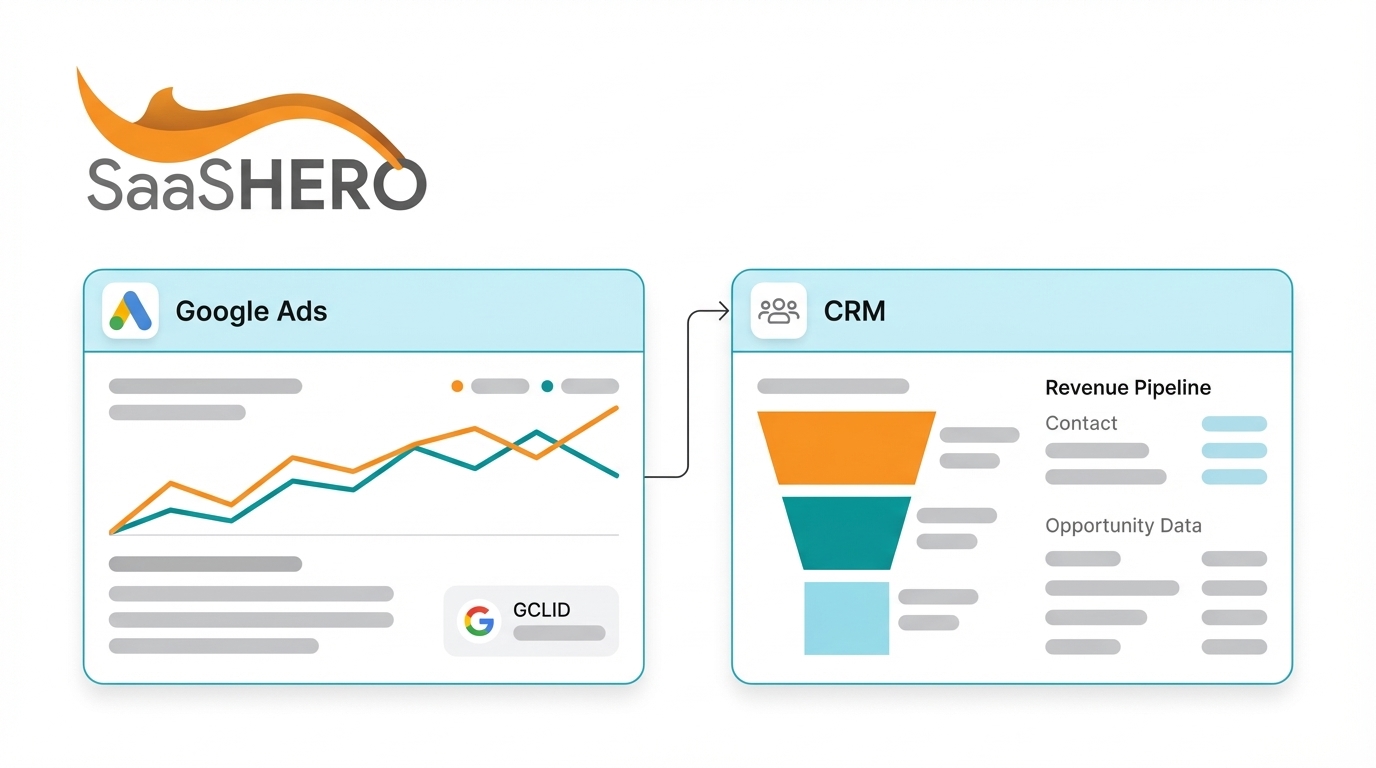
- Enable auto-tagging in Google Ads. Auto-tagging is required to import offline conversions and appends a GCLID parameter to every ad click URL.
- Capture the GCLID on every lead record in your CRM using a hidden form field. Without the GCLID captured at the point of form submission, the integration cannot attribute offline conversions to ad clicks.
- Connect and map fields between your CRM and Google Ads. Link CRM pipeline stages to Google Ads conversion actions and specify conversion value sources so Smart Bidding receives clear revenue signals.
- Import offline conversions by sending CRM stage events such as Qualified Lead, Opportunity Created, and Closed Won back to Google Ads on a scheduled or real-time basis within the 90-day upload window.
How to Integrate Google Ads with Salesforce
Salesforce’s native connector operates through Google Ads Data Manager. The setup requires authenticating the Salesforce org, creating a custom GCLID field on the Lead object, and mapping Opportunity stages to Google Ads conversion actions.
The complexity of Salesforce’s data model, which separates Lead, Contact, Account, and Opportunity objects, creates a specific failure point. The GCLID must be captured on the Lead record and explicitly preserved through Lead conversion to Contact and Opportunity. If the field is not mapped at conversion, the GCLID is lost and the integration cannot attribute revenue to ad clicks. In one documented B2B SaaS account, this failure made €338,000 in pipeline invisible to Smart Bidding.
Mapping multiple Opportunity stages to separate conversion actions such as MQL, SQL, Proposal, and Closed Won gives Smart Bidding value variance and faster feedback than waiting for a single Closed Won signal. A dedicated integration user or service account prevents the silent sync failure that occurs when the authenticating employee leaves the company.
How to Integrate Google Ads with HubSpot
HubSpot’s native Google Ads integration is available through the HubSpot App Marketplace and is generally less complex than the Salesforce path. The integration supports ad performance reporting in HubSpot, audience sync via Customer Match, and offline conversion imports for lifecycle stages such as MQL, SQL, and Customer.
Setup involves linking accounts in HubSpot, enabling the HubSpot tracking code on all relevant pages, and configuring Ad Conversion Events to send lifecycle stage changes back to Google Ads. Google Ads Data Manager also offers a native HubSpot connector configured on the Google Ads side, designed to feed HubSpot CRM signals into Smart Bidding. Advanced audience syncing and attribution reporting may require HubSpot Marketing Hub Professional at $890/month or higher.
How to Integrate Google Ads with Zoho CRM
Zoho CRM’s integration with Google Ads is less commonly documented than HubSpot or Salesforce and is typically more configuration-heavy and more dependent on field mapping, custom workflow automation, or middleware when native capabilities are insufficient. Zoho setups generally require more manual implementation effort to achieve the same closed-loop reporting available through the better-documented HubSpot and Salesforce routes. Teams using Zoho should plan for additional configuration time and consider middleware as a bridge for conversion import workflows.
Offline Conversion Tracking: The Key to Revenue Optimization
Offline conversion tracking closes the loop between an ad click and a CRM outcome. When a lead progresses to a qualified stage in your CRM, that event with its associated GCLID and conversion value is uploaded to Google Ads and becomes a training signal for Smart Bidding.
The single most important configuration decision is the distinction between primary and secondary conversions. Secondary conversions are tracked for visibility but excluded from account-wide optimization. These include form fills, content downloads, and webinar registrations. The primary conversion should be a CRM-verified event such as Qualified Lead, Opportunity Created, or Closed Won. Making a sales-aligned milestone the primary offline action and demoting soft form events to secondary trains the algorithm on revenue rather than activity.
For accounts where Closed Won volume is thin, Smart Bidding requires a minimum of 30–50 conversions per month per campaign to function effectively. Use an earlier funnel stage such as SQL or Opportunity Created as the primary conversion while Closed Won data accumulates. Sending early-funnel stages also provides Smart Bidding feedback before the 90-day upload window closes for long sales cycles.
Customer Match complements offline conversion tracking. Pairing Customer Match with an offline conversion feed lets Smart Bidding optimize toward pipeline while Customer Match describes the buyers and offline conversions confirm which clicks turned into revenue. Apply closed-won customer lists as exclusions on all acquisition campaigns first, since this is the highest-leverage use of the data before any targeting application.
Schedule a free audit with SaaSHero to see how CRM-connected optimization changes what your Google Ads account learns.
Common Mistakes to Avoid
The following failure patterns are well documented across B2B accounts and each carries a measurable cost.
- Optimizing for form fills instead of revenue. As noted earlier, this creates a self-fulfilling cycle. Reported Google Ads conversions are frequently inflated by 30–50% because of duplicate conversion actions, which further distorts performance reporting.
- Failing to capture the GCLID at form submission. The GCLID cannot be created retroactively. If the hidden field is missing from the form, no amount of CRM configuration recovers the attribution.
- Using last-click attribution for long sales cycles. Ad platforms attribute conversions to the day the click occurred, while CRMs report on the day the conversion happened. This creates systematic discrepancies that last-click attribution worsens by crediting only the final touchpoint.
- Not syncing CRM data regularly. Customer Match lists go stale quickly in B2B as people change jobs. A stale closed-won list can lock you out of win-back targets and push upgrade ads at people who already converted.
- Ignoring GCLID capture rate. A healthy integration should have the GCLID present on 80% or more of new web leads. A match rate below 60% typically indicates GCLIDs expiring before upload or formatting issues rejecting rows.
When to Bring in an Expert
Google Ads CRM integration becomes a full-time operational discipline once you factor in GCLID field architecture, CRM stage mapping, conversion action hierarchy, offline import scheduling, and Customer Match list management. For a mid-market B2B SaaS company with a marketing team of two to four generalists, this work competes directly with campaign strategy, content, and reporting.
The main failure mode is fragmentation. The ad account belongs to one party, the landing page to another, the CRM to RevOps, and the conversion tracking to whoever configured Google Tag Manager two years ago. Nobody owns the chain from impression to CRM record, and the marketing leader becomes the integration layer, acting as strategist, project manager, and quality control while vendors each execute their own scope.
SaaSHero focuses on this gap for B2B SaaS companies as an outsourced inbound growth team. As a Google Premier Partner (top 3% of agencies) and G2 High Performer ranked #20 of approximately 6,000 agencies, SaaSHero manages the entire paid acquisition funnel across paid media, creative, landing pages, and attribution under one accountability line. CRM integration functions as the measurement foundation every campaign is built on, and the team optimizes against CRM outcomes such as qualified pipeline, lifecycle stage, and closed revenue.
The flat-fee retainer, indexed to total monthly ad spend rather than channel count, keeps channel-mix decisions and integration work aligned with performance instead of invoice size. When SaaSHero recommends connecting your Salesforce Opportunity stages to Google Ads conversion actions, that recommendation carries no separate fee consequence.
Talk with SaaSHero to assess your current integration setup and see what revenue-optimized paid acquisition looks like in practice.
Conclusion: Turning Form Fills into Revenue Signals
CRM integration is the step that separates a Google Ads account that reports activity from one that drives revenue. The four-step process of auto-tagging, GCLID capture, field mapping, and offline conversion import applies across platforms. Execution complexity varies by CRM. HubSpot offers the most accessible native path, Salesforce requires careful GCLID preservation through Lead conversion, and Zoho demands more manual configuration.
Across all three, the governing principle stays consistent. Demote form fills to secondary status, make a CRM-verified pipeline event the primary conversion, and let Smart Bidding learn from qualified outcomes.
For most mid-market teams, the core decision centers on ownership. The integration touches the ad platform, the CRM, tag management, RevOps definitions, and the reporting layer at the same time. Without a single party accountable for the whole chain, the work fragments and the measurement degrades.
Schedule a free audit with SaaSHero to see how CRM-connected optimization changes what your Google Ads account learns.
Frequently Asked Questions
What is the difference between enhanced conversions for leads and standard offline conversion import?
Standard offline conversion import relies on the GCLID, the unique click identifier Google appends to every ad click URL, to match a CRM record back to the original ad click. Enhanced conversions for leads is an upgraded version of the same mechanism that supplements GCLID matching with hashed first-party data, typically the lead’s email address or phone number. When a GCLID is missing because of a privacy browser, a cross-device journey, or a delayed CRM entry, enhanced conversions for leads can still attribute the conversion using the hashed identifier.
In April 2026, Google merged enhanced conversions for web and for leads into a single unified setting, which simplifies setup. For B2B SaaS accounts with long sales cycles and high average contract values, using both mechanisms together, GCLID where present and hashed email as a fallback, produces the highest match rates and the cleanest signal for Smart Bidding.
Why do my Google Ads conversion numbers never match my CRM?
Google Ads and your CRM measure different parts of the journey. Google Ads attributes a conversion to the date of the original click and counts every qualifying event that fires, including spam submissions and bot traffic. Your CRM records a deal on the date it closes or the lead is entered, after qualification rules have filtered the raw volume.
Cross-device journeys, ad blockers, browser tracking prevention, and consent banners each remove part of the path between a click and a CRM record. Attribution model differences compound the gap. Google Ads may use data-driven attribution that distributes fractional credit across touchpoints, while your CRM may default to last-touch or manual entry. A 10–20% variance between the two systems is typically normal and expected.
The practical response is to treat the CRM as the source of truth for actual pipeline and revenue. Use Google Ads data to explain and improve those outcomes, and track the ratio between the two systems over time instead of expecting identical counts.
How does CRM integration affect Google Ads Smart Bidding performance?
Smart Bidding is a goal-seeking system that optimizes toward whatever conversion signal it receives, using historical data to predict which auctions are most likely to produce that outcome. When the signal is a form fill, Smart Bidding finds people who fill out forms. When the signal is a CRM-verified qualified opportunity with an associated revenue value, Smart Bidding finds people who become customers.
The quality of the conversion signal determines the quality of the traffic the algorithm buys. Implementing value-based bidding, assigning different conversion values to MQLs, SQLs, and closed-won deals, can improve overall lead quality by 25–40%. For accounts where closed-won volume is too thin to meet Smart Bidding’s minimum conversion thresholds, mapping an earlier CRM stage such as SQL or Opportunity Created as the primary conversion provides the algorithm with enough signal to function while deeper revenue data accumulates.
What data privacy requirements apply when integrating CRM data with Google Ads?
Privacy obligations apply before data reaches Google. For Customer Match and enhanced conversions for leads, you must have lawful basis to use the customer data for advertising purposes. In the EU under GDPR, that typically means explicit consent. Google hashes identifiers like email addresses before upload, but hashing does not remove the underlying consent requirement.
In the EU, remarketing and Customer Match audiences may be significantly smaller than raw CRM list sizes because they can only include users who have explicitly opted in. Google’s Consent Mode should be implemented where Google tags are in use, passing the relevant consent signals for EEA, UK, and Swiss traffic. Customer Match list memberships age out after 540 days, so a refresh routine is required to maintain match rates and compliance.
For US-based advertisers, CCPA and CPRA requirements apply to audience lists containing California residents. These frameworks require clear opt-out mechanisms for the sharing of personal data for targeted advertising.
When should a B2B SaaS company outsource Google Ads CRM integration rather than handle it in-house?
The decision turns on whether the internal team has the combination of paid media expertise, RevOps access, and engineering capacity to own the full chain from ad click to CRM record, and whether they have the bandwidth to maintain it. The integration touches Google Tag Manager, the ad platform, the CRM data model, lifecycle stage definitions, and the reporting layer at the same time.
A breakdown at any point, such as a GCLID field not mapped through Lead conversion in Salesforce, a conversion action misconfigured as primary when it should be secondary, or an offline import job that fails silently, degrades the signal quality that Smart Bidding depends on. These issues often appear without any visible alert.
For mid-market teams running two to four generalist marketers with no dedicated paid media or RevOps specialist, the integration work competes directly with everything else on the team’s calendar. Outsourcing to a partner who owns the full funnel, including the CRM connection, the conversion architecture, and the ongoing import maintenance, removes the fragmentation risk and keeps the measurement layer aligned with the bidding decisions.